
Map viewer in OBIEE 11g - Part -2


Map View in OBIEE 11g – Part 2

Building Map View in Presentation Side (Answer)
1.      Login to presentation (Answer side) to check the map view is working or not.(http://localhost:9704/analytics)
2.      Already we have changed the privileges for map data.
3.      Click on Administration Γ  go to Map Data Management Γ  Click on Manage Map Data.


4.      Initially there won’t be layers, background Maps and Images.

5.      Click here to add a new layer, to add layers from mv demo data.
A new dialogue box will get open to import layers from the created data sources.

6.      Once you add layers then we need to subject areas for the layers.
Need to add BI key column s from the subject areas.


Click ok.
7.      Go to the next tab “Background Maps” and add background maps.


Check in the list whether the created bing map1 and its subject area are created.

8.      To add images go to 3rd tab, you can assign images from mvdemo.


Click under the name, you will get a new dialogue box with lot of images under created data source.
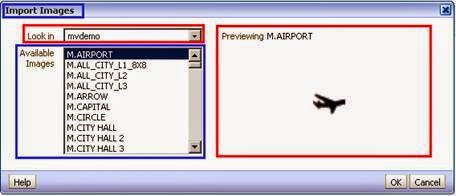
Click ok.

9.      Create new analysis with that subject area and add map view.
Add some column from the subject areas which have given in Managed Map data.

Click results to view the compound layout, in that add Map view to get the map.


Comments

Popular posts from this blog

Top 100 Informatica Interview Questions

I have attended Informatica interview last week in wipro and couple of other companies, Question below I faced in those companies. 1. What are the main issues while working with flat files as source and as targets ? 2. Explain about Informatica server process that how it works relates to mapping variables? 3. write a query to retrieve the latest records from the table sorted by version(scd) 4. How do you handle two sessions in Informatica 5. which one is better performance wise joiner or look up 6. How to partition the Session? 7. How many types of sessions are there in informatica.please explain them. 8. Explain the pipeline partition with real time example? 9. Explain about cumulative Sum or moving sum? 10. CONVERT MULTIPLE ROWS TO SINGLE ROW (MULTIPLE COLUMNS) IN INFORMATICA 11. DEPLOYMENT GROUPS IN INFORMATICA 12. LOAD LAST N RECORDS OF FILE INTO TARGET TABLE - INFORMATICA 13. LOAD ALTERNATIVE RECORDS / ROWS INTO...

Top 130 SQL Interview Questions And Answers

1. Display the dept information from department table.   Select   *   from   dept; 2. Display the details of all employees   Select * from emp; 3. Display the name and job for all employees    Select ename ,job from emp; 4. Display name and salary for all employees.   Select ename   , sal   from emp;   5. Display employee number and total salary   for each employee. Select empno, sal+comm from emp; 6. Display employee name and annual salary for all employees.   Select empno,empname,12*sal+nvl(comm,0) annualsal from emp; 7. Display the names of all employees who are working in department number 10   Select ename from emp where deptno=10; 8. Display the names of all employees working as   clerks and drawing a salary more than 3000   Select ename from emp where job=’clerk’and sal>3000; 9. Display employee number and names for employees who earn commissi...

OBIEE 11g dumps

I have cleared OBIEE 11g certification exam (1z0-591) exam yesterday, It was damn easy when compared to OBIEE 10g certification. I have referenced oracle PDF and some of the other OBIEE dumps. I remember some of the question which came in exam. I will publish those question very soon